Mastering Fortnite Ballistic: Optimal Settings for First-Person Combat
Fortnite, while not typically a first-person shooter, introduces Ballistic, a new game mode that changes the perspective. This guide highlights the best settings adjustments within Ballistic to enhance your gameplay.
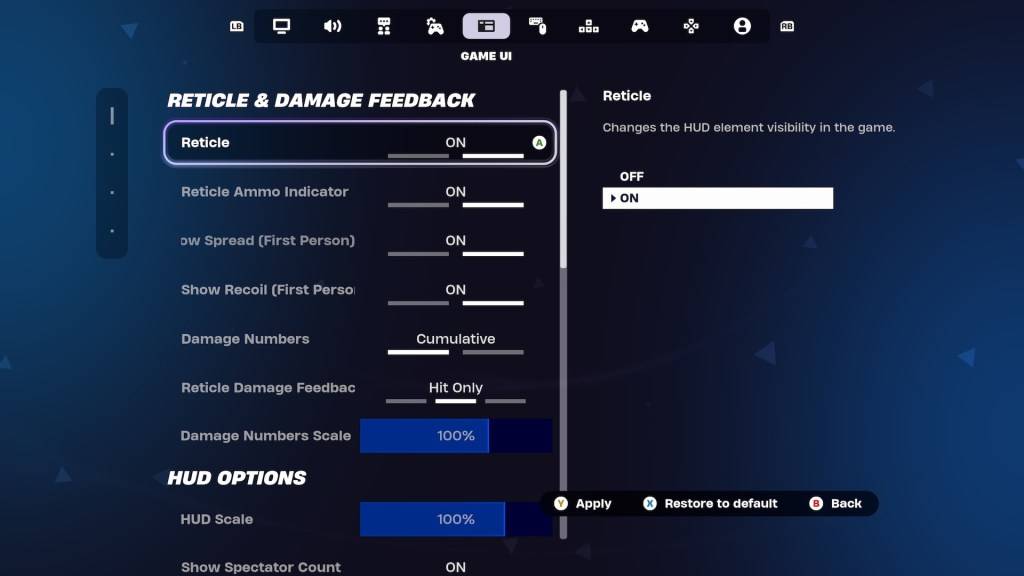
For seasoned Fortnite players, adjusting settings is crucial. Thankfully, Epic Games provides Ballistic-specific options within the Game UI's Reticle & Damage Feedback tab. Let's explore the key settings and recommended configurations:
Show Spread (First Person)
This setting dynamically expands your reticle to visualize your weapon's shot dispersion. However, in Ballistic, hip-firing proves surprisingly effective, negating the typical benefit of this setting. Disabling "Show Spread" allows for clearer reticle focus, improving headshot accuracy.
Related: A Deep Dive into Fortnite Chapter 6, Season 1 Sprites & Boons
Show Recoil (First Person)
Recoil significantly impacts accuracy in Ballistic. Fortunately, you can choose whether the reticle reflects recoil. Unlike "Show Spread," keeping "Show Recoil" enabled is advantageous. This visual feedback helps manage recoil, especially crucial when using powerful Assault Rifles where raw power compensates for reduced accuracy.
Alternatively, you can completely disable the reticle. While challenging for casual players, experienced players aiming for high-ranked performance might find this provides greater control.
These adjustments represent the optimal settings for Fortnite Ballistic. For additional competitive advantages, explore the Simple Edit feature in Battle Royale.
Fortnite is available on various platforms, including Meta Quest 2 and 3.




![Taffy Tales [v1.07.3a]](https://imgs.xfsxw.com/uploads/32/1719554710667e529623764.jpg)